Common Hex Values Reference
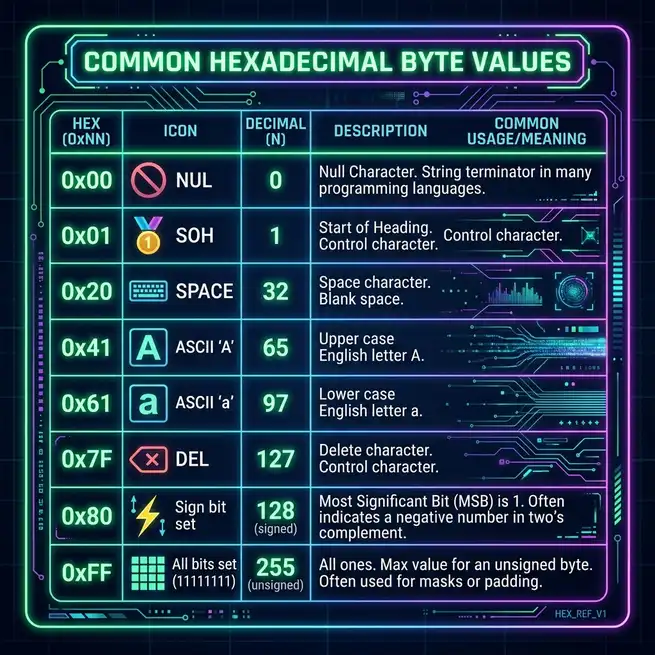
Essential Hexadecimal Reference Cheat Sheet
How to Use This Page
This page is a working reference for the hex values you actually use day to day: the printable ASCII set, the most common control codes, the URL-encoding table, and the file signatures that show up in hex dumps. It is intentionally not exhaustive. For that, the official Unicode code charts and the IANA registry of file signatures are linked at the bottom. Everything here is the subset we reach for ourselves.
If you find yourself coming back to this page more than once a week, the tables below are small enough to internalise entirely. After that, you will not need to look anything up.
Printable ASCII (0x20–0x7E)
Printable ASCII covers 95 characters: space, the punctuation characters, the digits 0–9, the uppercase alphabet, and the lowercase alphabet. Every character in this range fits in a single byte, and the high bit is zero.
| Char | Dec | Hex | Char | Dec | Hex | Char | Dec | Hex | Char | Dec | Hex |
|---|---|---|---|---|---|---|---|---|---|---|---|
| (sp) | 32 | 20 | 0 | 48 | 30 | @ | 64 | 40 | P | 80 | 50 |
| ! | 33 | 21 | 1 | 49 | 31 | A | 65 | 41 | Q | 81 | 51 |
| " | 34 | 22 | 2 | 50 | 32 | B | 66 | 42 | R | 82 | 52 |
| # | 35 | 23 | 3 | 51 | 33 | C | 67 | 43 | S | 83 | 53 |
| $ | 36 | 24 | 4 | 52 | 34 | D | 68 | 44 | T | 84 | 54 |
| % | 37 | 25 | 5 | 53 | 35 | E | 69 | 45 | U | 85 | 55 |
| & | 38 | 26 | 6 | 54 | 36 | F | 70 | 46 | V | 86 | 56 |
| ' | 39 | 27 | 7 | 55 | 37 | G | 71 | 47 | W | 87 | 57 |
| ( | 40 | 28 | 8 | 56 | 38 | H | 72 | 48 | X | 88 | 58 |
| ) | 41 | 29 | 9 | 57 | 39 | I | 73 | 49 | Y | 89 | 59 |
| * | 42 | 2A | : | 58 | 3A | J | 74 | 4A | Z | 90 | 5A |
| + | 43 | 2B | ; | 59 | 3B | K | 75 | 4B | [ | 91 | 5B |
| , | 44 | 2C | < | 60 | 3C | L | 76 | 4C | \ | 92 | 5C |
| - | 45 | 2D | = | 61 | 3D | M | 77 | 4D | ] | 93 | 5D |
| . | 46 | 2E | > | 62 | 3E | N | 78 | 4E | ^ | 94 | 5E |
| / | 47 | 2F | ? | 63 | 3F | O | 79 | 4F | _ | 95 | 5F |
| ` | 96 | 60 | |||||||||
| a | 97 | 61 | |||||||||
| b | 98 | 62 | |||||||||
| c | 99 | 63 | |||||||||
| d | 100 | 64 | |||||||||
| e | 101 | 65 | |||||||||
| f | 102 | 66 | |||||||||
| g | 103 | 67 | |||||||||
| h | 104 | 68 | |||||||||
| i | 105 | 69 | |||||||||
| j | 106 | 6A | |||||||||
| k | 107 | 6B | |||||||||
| l | 108 | 6C | |||||||||
| m | 109 | 6D | |||||||||
| n | 110 | 6E | |||||||||
| o | 111 | 6F | |||||||||
| p | 112 | 70 | |||||||||
| q | 113 | 71 | |||||||||
| r | 114 | 72 | |||||||||
| s | 115 | 73 | |||||||||
| t | 116 | 74 | |||||||||
| u | 117 | 75 | |||||||||
| v | 118 | 76 | |||||||||
| w | 119 | 77 | |||||||||
| x | 120 | 78 | |||||||||
| y | 121 | 79 | |||||||||
| z | 122 | 7A | |||||||||
| { | 123 | 7B | |||||||||
| | | 124 | 7C | |||||||||
| } | 125 | 7D | |||||||||
| ~ | 126 | 7E |
The remaining printable codes, 0x7F (delete) and everything below
0x20, are control characters. They are not printable, but they show up
constantly in network protocols, log files, and binary formats.
Common Control Codes (0x00–0x1F)
The first 32 ASCII codes are non-printable control characters. They were originally defined for controlling teleprinters, but a handful of them are still in active use today.
| Hex | Dec | Name | Where it shows up |
|---|---|---|---|
| 00 | 0 | NUL | C string terminator, null bytes in binary protocols |
| 01 | 1 | SOH | Start of heading, very rare outside legacy protocols |
| 02 | 2 | STX | Start of text, used in some serial protocols |
| 03 | 3 | ETX | End of text, Ctrl+C, common in framing protocols |
| 04 | 4 | EOT | End of transmission |
| 05 | 5 | ENQ | Enquiry, very rare |
| 06 | 6 | ACK | Acknowledgement, used in serial comms and TLS |
| 07 | 7 | BEL | Terminal bell, system beep |
| 08 | 8 | BS | Backspace, also used in regex word boundaries |
| 09 | 9 | HT (TAB) | Horizontal tab, \t in most languages |
| 0A | 10 | LF | Line feed, \n in Unix, second byte in Windows CRLF |
| 0B | 11 | VT | Vertical tab, rare |
| 0C | 12 | FF | Form feed, page break in printer output |
| 0D | 13 | CR | Carriage return, \r, first byte in Windows CRLF |
| 1B | 27 | ESC | Escape, first byte of ANSI terminal control sequences |
Two of these, 0x0A (LF) and 0x0D (CR), are responsible for
almost every "weird newline" bug you have ever seen. Unix uses LF only, classic Mac used
CR only, and Windows uses CRLF (the pair 0x0D 0x0A). Most modern tools
handle all three, but the bytes still show up in hex dumps and are worth recognising on
sight.
File Signatures (Magic Numbers)
The first few bytes of a file identify its type. When you see an unfamiliar file in a hex dump, the magic number is almost always the fastest way to figure out what it is. The table below lists the magic numbers for the formats you are most likely to encounter on the modern web.
| File type | First bytes (hex) | ASCII shown |
|---|---|---|
| PNG image | 89 50 4E 47 0D 0A 1A 0A | ‹PNG› |
| JPEG image | FF D8 FF | (binary) |
| GIF image | 47 49 46 38 | GIF8 |
| PDF document | 25 50 44 46 2D | %PDF- |
| ZIP archive | 50 4B 03 04 | PK.. |
| GZIP archive | 1F 8B | (binary) |
| tar archive | 75 73 74 61 72 | ustar |
| ELF executable (Linux) | 7F 45 4C 46 | .ELF |
| Mach-O executable (macOS) | CF FA ED FE | (binary) |
| PE executable (Windows) | 4D 5A | MZ |
| WebP image | 52 49 46 46 ?? ?? ?? ?? 57 45 42 50 | RIFF....WEBP |
| MP4 / MOV video | 00 00 00 ?? 66 74 79 70 | ....ftyp |
| UTF-8 BOM | EF BB BF | (binary) |
| UTF-16 LE BOM | FF FE | (binary) |
For the authoritative, comprehensive list, the IANA registry of media types and the
file command's magic database (typically
/usr/share/file/magic on Linux) are the canonical sources.
Common URL-Encoded Characters
URLs may only safely contain a subset of ASCII. Characters outside that set are percent-encoded, where the percent is followed by two hex digits giving the character's code point. The most common URL-encoded characters are shown below.
| Character | Hex | URL-encoded | When you see it |
|---|---|---|---|
| (space) | 20 | %20 | Spaces in query strings, often + in form data |
| ! | 21 | %21 | Rare; usually safe in URLs |
| " | 22 | %22 | Double quotes inside query values |
| # | 23 | %23 | Hash literal, must be encoded in query values |
| % | 25 | %25 | Literal percent sign |
| & | 26 | %26 | Ampersand in query values |
| ' | 27 | %27 | Single quote |
| + | 2B | %2B | Plus sign, ambiguous in form-encoded data |
| / | 2F | %2F | Slash in path components |
| : | 3A | %3A | Colon in path segments |
| = | 3D | %3D | Equals in query values |
| ? | 3F | %3F | Question mark, separates path from query |
| @ | 40 | %40 | At sign in user info |
| < | 3C | %3C | Less-than |
| > | 3E | %3E | Greater-than |
| \ | 5C | %5C | Backslash, used in Windows paths |
| | | 7C | %7C | Pipe, sometimes seen in URLs |
A quick way to recognise percent-encoding in the wild: any time you see a
% followed by two characters in the ranges 0–9, A–F, or a–f, that is a
percent-encoded byte. Decode it by treating the two characters as a hex number.
Common CSS Colour Hex Codes
A short reference of the most-used CSS named colours and their hex equivalents. The full list of 147 named CSS colours is in the CSS Color Module Level 4 spec, linked at the bottom.
| Swatch | Name | Hex | RGB |
|---|---|---|---|
| black | #000000 | 0, 0, 0 | |
| white | #FFFFFF | 255, 255, 255 | |
| red | #FF0000 | 255, 0, 0 | |
| lime | #00FF00 | 0, 255, 0 | |
| blue | #0000FF | 0, 0, 255 | |
| yellow | #FFFF00 | 255, 255, 0 | |
| cyan / aqua | #00FFFF | 0, 255, 255 | |
| magenta / fuchsia | #FF00FF | 255, 0, 255 | |
| silver | #C0C0C0 | 192, 192, 192 | |
| gray | #808080 | 128, 128, 128 | |
| maroon | #800000 | 128, 0, 0 | |
| olive | #808000 | 128, 128, 0 | |
| green | #008000 | 0, 128, 0 | |
| purple | #800080 | 128, 0, 128 | |
| teal | #008080 | 0, 128, 128 | |
| navy | #000080 | 0, 0, 128 | |
| orange | #FFA500 | 255, 165, 0 |
For a deeper treatment of how hex colours are constructed and how to design accessible palettes around them, see the dedicated hex colours guide.
Reserved and Special Values
A handful of hex values come up so often in special contexts that they are worth knowing by themselves.
-
0x00is the null byte. Marks the end of a C string and is a frequent source of bugs in fixed-width buffers (truncation at the first null, missing data after a null in a foreign format). -
0x0Aand0x0Dare LF and CR, the line-ending bytes. See the control codes table above. -
0xFFis "all bits set" in an 8-bit value. Used as a sentinel value, a max sentinel, and a mask for the low byte of a 16-bit word. -
0xFFFF,0xFFFFFFFFare all bits set in 16 and 32 bits respectively. The "broadcast" address in IPv4 (255.255.255.255) is the decimal form of0xFFFFFFFF. -
0x7Fis the delete control code, and also the high bit of a 7-bit ASCII value. -
0x80,0x8000,0x80000000are the sign bit set in 8, 16, and 32 bits. The smallest negative number in two's-complement signed types. -
0xDEADBEEF,0xCAFEBABEare sentinels used to mark uninitialised or special memory regions in many codebases. Recognise them on sight.
External References
When this page is not enough (and it eventually will not be, because hex shows up in every domain), these are the resources we reach for:
- Unicode code charts is the authoritative reference for every code point, including the full hex range above 0x7F.
- CSS Color Module Level 4 is the formal definition of every CSS named colour, including the 148 named colours in the basic and extended sets.
- RFC 4648 is the canonical spec for base16 (hex), base32, and base64 encoding.
- RFC 3986 is the URL syntax spec, which defines percent-encoding (Section 2.1) and the unreserved character set (Section 2.3).
-
The
filecommand'smagicdatabase (typically/usr/share/file/magicon Linux) is the comprehensive list of file signatures and their interpretations.
Decode a hex string, encode a file, or look up a value:
Open Hex Decoder →Try the Free HexDecoder Tool
Put what you learned into practice. Use our free hex decoder and encoder to convert hexadecimal to text, ASCII, binary, and more instantly in your browser. No registration or upload required.
Open HexDecoder