Troubleshooting Hex Decoding Errors
Why a Troubleshooting Guide?
Hex decoding usually just works, but the failure modes when it does not are predictable. Almost every "weird output" we have seen in production is one of a small set of causes: an odd number of hex digits, a stray non-hex character, whitespace that was not expected, an encoding mismatch, or a missing prefix. The sections below cover each one with a worked example, the typical symptom, and the fix.
If you are reading this because a specific decode just failed, jump to the section that matches the symptom. If you want a checklist you can run through before each decode, skip to the bottom of the page.
Error 1: Odd-Length Hex String
Symptom: the decoder throws "invalid length" or returns the wrong number of characters.
Hex pairs are bytes, and bytes are pairs of hex digits. If the input has an odd length, the last digit has no partner, and the decoder cannot decide what to do with it.
Wrong:   48656C6C6  (9 characters — the trailing 6 is orphaned)
Right:   48656C6C6F (10 characters, complete pairs)
Fixes (any one is correct, depending on intent):
- If a digit is genuinely missing, append the correct one to make the length even.
-
If the input is supposed to represent a fixed number of bytes and the leading zero was
lost, prepend a
0to make the length even. - If the input is genuinely malformed, do not try to decode it. Fix the source.
Error 2: Invalid Hex Characters
Symptom: the decoder returns a parse error and points at a specific position, or silently drops characters and returns the wrong length.
Valid hex digits are 0 through 9 and A through
F (case-insensitive). Anything else, including letters G through Z, punctuation,
spaces inside the string, full-width digits, and control codes, will either be rejected or
skipped.
Valid:    48656C6C6F   ←  Hello
Invalid:  48GZ6C6C6F   ←  G, Z are not hex
Invalid:  48 65 6C 6C 6F (with embedded spaces; some decoders allow this, most do not)
Invalid:  48656C (full-width digits; visually identical, not the same bytes)
Common causes we see in the wild:
- Copy-paste from a code editor that added syntax highlighting. Some editors inject a non-breaking space or zero-width character at column boundaries. The hex looks fine, but one of the "spaces" is actually U+00A0 or U+200B.
-
OCR or screenshot extraction. Image-to-text pipelines often misread
0asO,1asl, and so on. The result is a hex string full of letters that look like digits. -
Full-width or non-ASCII digits. Some word processors and chat clients
auto-substitute
1with1(U+FF11). The characters are visually identical but are not in the ASCII hex range. - A genuine encoding mistake in the source. The producer of the hex string wrote the wrong character, and the consumer of the hex string sees a parse error.
Fixes: re-paste from the original source, validate the input against
/^[0-9A-Fa-f]*$/ before decoding, and if you are writing a decoder, fail
loudly with a clear position indicator rather than silently dropping the bad character.
Error 3: Stray 0x or # Prefixes
Symptom: the decoder throws on the first character, or strips the prefix and then decodes the rest correctly.
Different conventions attach different prefixes to hex values. C, C++, Rust, and Python
use 0x. CSS colour codes use #. Assembly and many debuggers
use $. SQL and a few other languages use X' and
' as bookends.
0x48656C6C6F  ←  C / Python literal
#48656C6C6F   ←  CSS colour (only the leading # is dropped)
$48656C6C6F   ←  Some assembly syntaxes
X'48656C6C6F' ←  SQL hex literal
Fixes: strip the prefix before passing the string to a decoder that
does not understand it. Most production decoders handle the 0x prefix and
the # prefix as a courtesy, but a strict parser will reject them.
Error 4: Mixed Case and Embedded Whitespace
Symptom: some decoders reject the input; others silently accept and produce the correct output.
Hex digits can be uppercase (48656C6C6F) or lowercase
(48656c6c6f); both are valid. Embedded whitespace (usually a single space
between byte pairs) is also common, but only some decoders accept it.
Equivalent representations of "Hello":

  48656C6C6F       (uppercase, no spaces)
  48656c6c6f       (lowercase, no spaces)
  48 65 6C 6C 6F   (uppercase, with spaces)
  48 65 6c 6c 6f   (lowercase, with spaces)
  48-65-6C-6C-6F   (uppercase, with dashes, used in some dump formats)
Fixes: if your decoder does not handle whitespace or dashes, normalise
the input first. A one-liner in most languages:
input.replace(/[\s-]/g, '').toUpperCase(). The result is a canonical form
that every decoder will accept.
Error 5: Wrong Output Encoding (Mojibake)
Symptom: the decode succeeds, but the resulting text contains
characters like é instead of é, or strange replacement
characters () where a non-ASCII character should be.
Hex bytes are just bytes. They have no inherent meaning. The character interpretation depends on the encoding you tell the decoder to use. The two encodings that matter in practice are ASCII (or its modern extension, UTF-8) and Latin-1 (Windows-1252 in the Windows world). Mixing them up is the classic source of "mojibake" output.
Bytes:       C3 A9  (two bytes)
UTF-8:       é       (U+00E9, the letter e with acute accent)
Latin-1:     é     (two characters, the first being U+00C3)

Bytes:       E2 98 83  (three bytes)
UTF-8:       ☃       (U+2603, the snowman)
Latin-1:     ☃     (three characters, none of which is a snowman)
How to tell which encoding you have:
- If the hex came from a modern system, a web page, a JSON file, a UTF-8 source file, or a Linux machine, it is almost always UTF-8.
- If the hex came from a Windows tool that does not say "UTF-8", a legacy database, or a CSV opened in Excel without specifying an encoding, it is probably Windows-1252.
-
If the text should contain non-ASCII characters and you see
é,’, or other two-character sequences where one character should be, the input is almost certainly UTF-8 decoded as Latin-1. Re-decode as UTF-8. -
If you see
(U+FFFD, the replacement character), the bytes do not form a valid sequence in the encoding you selected. Try a different encoding.
Error 6: Surrogate Pairs in UTF-16
Symptom: characters outside the Basic Multilingual Plane (most emoji, some CJK characters) appear as two replacement characters or as garbled output.
UTF-8 is the default on the modern web, and almost every hex decoder now assumes UTF-8
input. If you happen to be decoding a UTF-16 string (a Windows registry blob, a Java
String serialised to bytes, an old Outlook PST), the bytes need to be
paired and interpreted in UTF-16 code units, not in single-byte UTF-8.
The snowman ☃ in UTF-8:        E2 98 83         (3 bytes)
The snowman ☃ in UTF-16 LE:   03 26            (2 bytes, little-endian)
The snowman ☃ in UTF-16 BE:   26 03            (2 bytes, big-endian)

The grin emoji 😀 (outside BMP) in UTF-8:  F0 9F 98 80   (4 bytes)
The grin emoji 😀 in UTF-16 LE:           3D D8 00 DE   (4 bytes, surrogate pair)
Fix: if you are decoding UTF-16, ensure your decoder uses the right byte order (little-endian or big-endian) and handles surrogate pairs as a single code point. Most off-the-shelf decoders do not; you may need to write a small script.
Error 7: Trailing Whitespace and Newlines
Symptom: the decode succeeds but returns a few extra characters at the end (a trailing space, a newline, a NUL byte), or the last byte is missing.
Hex strings copied from logs, source files, or terminal output frequently carry a
trailing newline (\n, hex 0A), a trailing carriage return
(\r, hex 0D), or a NUL terminator from a C string
(\0, hex 00). These are bytes that were not meant to be part
of the payload, but they are valid hex characters and most decoders will include them.
Raw log line:     48656C6C6F0A   (Hello + newline)
Decoded naive:    "Hello\n"
Decoded stripped: "Hello"          ← probably what you want
Fixes: trim trailing whitespace before decoding, or post-process the decoded text to strip known trailing bytes. If the source is a log line, the protocol definition should tell you whether the line terminator is part of the message or not.
Error 8: Wrong Tool for the Job
Symptom: you paste your hex into a hex decoder and the output makes no sense at all: not garbled, not the wrong encoding, just not interpretable as text.
Not every hex string is text. The bytes might be a binary structure, a compressed blob, an image header, a private key, a number, or a packed record. Hex decoders interpret the input as text, and if the input is not text, the result is meaningless.
What to do instead:
- Look at the first few bytes. If they match a known file signature (PNG, JPEG, PDF, ZIP, etc.), you have a binary file, not text. See our common hex values reference for the most common signatures.
- Check whether the producer of the hex string described the encoding. "Hex-encoded JSON" is text; "hex-encoded gzip" is not.
- If the input is genuinely binary, you need a tool that interprets the specific format, like a JSON parser for hex-encoded JSON or a PNG viewer for hex-encoded images. The hex decoder is the right tool only when the hex represents text.
Pre-Flight Checklist for Reliable Hex Decoding
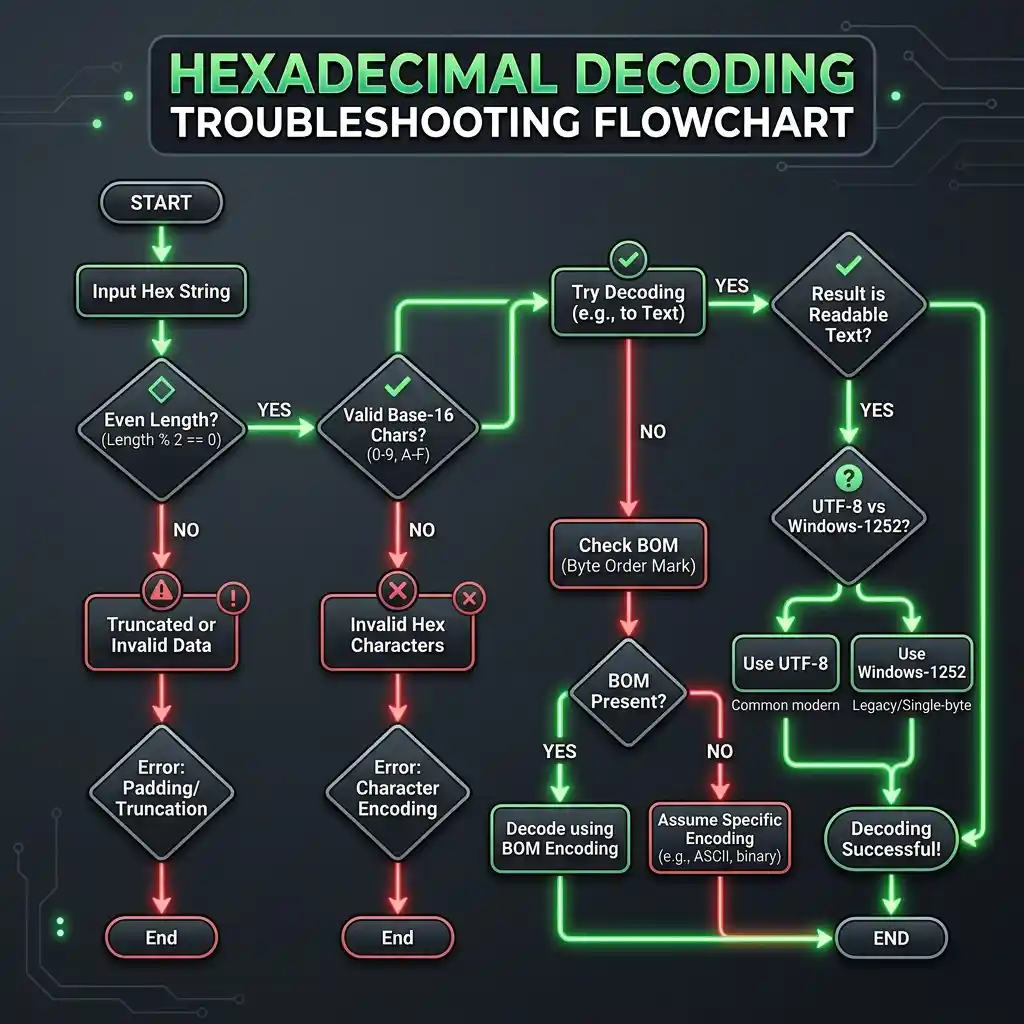
Flowchart to debug common decoding failures
Before you paste a hex string into a decoder, run through this list. It catches 95% of the issues we have seen in practice.
-
Length is even. If not, prepend a
0or fix the source. -
No invalid characters. Every character is in
0-9 A-F a-f, with optional whitespace or dashes between byte pairs. -
No stray prefixes. Strip
0x,#,$, orX'…'as needed. - No trailing whitespace or terminator bytes unless they are supposed to be part of the payload.
- Encoding is known and stated. UTF-8 is the safe default; if the source is Windows-1252, say so explicitly.
- Output is expected to be text. If the bytes are a known binary format, use a format-specific tool, not a text decoder.
Once the input passes all six checks, the decode should succeed first time. If it does not, the issue is almost always in the source data, not in the decoder.
Paste your hex string and see what it decodes to:
Open Hex Decoder →Try the Free HexDecoder Tool
Put what you learned into practice. Use our free hex decoder and encoder to convert hexadecimal to text, ASCII, binary, and more instantly in your browser. No registration or upload required.
Open HexDecoder