Hex Color Codes in Web Design
What Are Hex Color Codes?
Hex color codes are a notation for representing the intensity of the red, green, and
blue channels of an RGB color as a single short string. The format is
#RRGGBB, where RR, GG, and BB are
two-digit hexadecimal numbers from 00 to FF representing the
intensity of the red, green, and blue channels respectively.
Each two-digit hex pair can encode 256 different values (00 through FF in hex, 0 through 255 in decimal), and with three channels the total space is 256 × 256 × 256 = 16,777,216 distinct colors. That is the same set of colors as 24-bit RGB and 32,768 times the 512-color palette of an old-school VGA display, so the modern web can comfortably assume 24-bit color everywhere.
Hex Color Structure: A Worked Example
Format:        #RRGGBB

#FF0000  →   R: 0xFF = 255    Red
            G: 0x00 = 0      Green
            B: 0x00 = 0      Blue
            Result: pure red

#00FF00  →   pure green
#0000FF  →   pure blue
#FFFFFF  →   all channels at 255, which is white
#000000  →   all channels at 0, which is black
#808080  →   equal mid-grey
#3B82F6  →   R:59, G:130, B:246 (a popular blue shade)
The leading # is required in CSS, but most other contexts (SVG, JavaScript
string APIs, JSON manifests) accept both the # form and the bare
RRGGBB form. The case of the hex digits is not significant —
#ff5733 and #FF5733 resolve to the same color.
Short Hex Notation
CSS supports a three-digit shorthand when each channel is a doubled digit. The browser
expands #RGB to #RRGGBB by repeating each digit. That makes
#F00 equivalent to #FF0000, and #0F0 equivalent
to #00FF00.
The shorthand only works when both digits in each channel would have been the same.
#F53 is not a valid shorthand for #FF5533 — that is just a
different (and not particularly useful) shorthand that browsers do not expand.
#FFFFFF  →  #FFF   (white)
#000000  →  #000   (black)
#FF0000  →  #F00   (red)
#00FF00  →  #0F0   (green)
#0000FF  →  #00F   (blue)
#FF5733  →  no shorthand (digits are not paired)
The shorthand is most useful in design systems and component libraries where a small palette is repeated hundreds of times — saving one byte per color across a stylesheet adds up. For ad-hoc styles, prefer the long form to keep the document readable.
Hex with Alpha: 8-Digit Colors
Modern CSS supports an eight-digit hex notation #RRGGBBAA where the final
two digits encode the alpha (opacity) channel. 00 is fully transparent,
FF (or omitted) is fully opaque, and any value in between is a partial
transparency. There is also a four-digit shorthand #RGBA for the same idea.
/* Fully opaque (default) */
.card         { background-color: #0EA5E9; }   /* sky blue */
.card-alpha   { background-color: #0EA5E9FF; } /* identical */

/* 80% opaque */
.overlay      { background-color: #0EA5E9CC; } /* CC = 204 / 255 ≈ 0.80 */

/* 50% opaque */
.hover        { background-color: #0EA5E980; } /* 80 = 128 / 255 ≈ 0.50 */

/* Fully transparent */
.invisible    { background-color: #0EA5E900; }
This is more compact than the equivalent rgba(...) function and is well
supported in all modern browsers. It is especially useful for hover states, layered
overlays, and design tokens that need to carry their own opacity.
Converting Between Hex and RGB by Hand
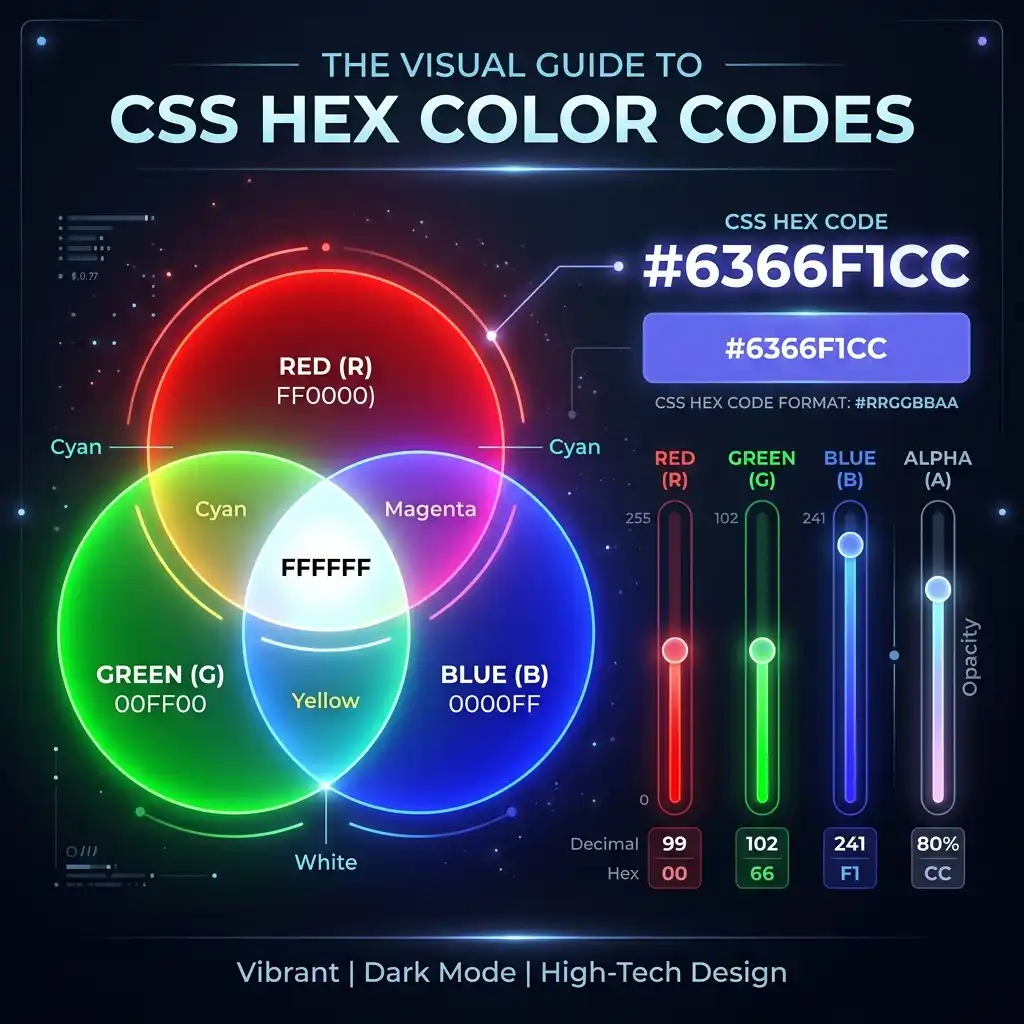
How Red, Green, and Blue channels map to CSS hex color values
You do not need a calculator to convert between hex and RGB. Each channel is a two-digit base-16 number, and the conversion is just a single base change.
Hex to RGB
Take each pair of hex digits, interpret them as a base-16 number, and you have the
decimal channel value. The example below walks through the popular Tailwind blue
#3B82F6:
#3B82F6

3B  = 3 × 16 + 11 = 48 + 11 = 59    →  R: 59
82  = 8 × 16 + 2  = 128 + 2  = 130  →  G: 130
F6  = 15 × 16 + 6 = 240 + 6  = 246  →  B: 246

Result: rgb(59, 130, 246)
RGB to Hex
The reverse is the same operation in the other direction: divide the decimal value by 16 to get the high digit (0–F) and take the remainder for the low digit (0–F).
rgb(255, 99, 71)  →  tomato

255 ÷ 16 = 15 remainder 15   →  FF
99  ÷ 16 = 6  remainder 3    →  63
71  ÷ 16 = 4  remainder 7    →  47

Result: #FF6347
For quick conversion in the browser, the HexDecoder homepage tool will
accept a hex color and output the matching RGB, HSL, and other useful formats. For more
involved work, the CSS Color Module Level 4 spec defines additional notations like
color(), lab(), and oklch() that go beyond RGB;
the linked Web Development guide covers those in
detail.
Hex Colors in CSS: Practical Patterns
Hex is the most common way to write colors in real CSS files. A few patterns come up often enough to be worth knowing well.
Design tokens
Most design systems define a small palette of named hex colors and reference them as custom properties. The trick that makes the system maintainable is naming colors by role (primary, surface, danger) rather than by appearance (indigo, white, red), so that re-theming is a one-line change.
:root {
  --color-bg:       #FFFFFF;
  --color-surface:  #F8FAFC;
  --color-text:     #0F172A;
  --color-muted:    #64748B;
  --color-primary:  #0EA5E9;
  --color-primary-hover: #0284C7;
  --color-danger:   #DC2626;
  --color-success:  #16A34A;
  --color-border:   #E2E8F0;
}

body           { background: var(--color-bg); color: var(--color-text); }
.button-primary { background: var(--color-primary); color: white; }
.button-primary:hover { background: var(--color-primary-hover); }
Dark mode without rewriting palettes
The custom-property approach also makes dark mode almost free. The light theme sets the
properties under :root; a
@media (prefers-color-scheme: dark) block overrides them with dark-theme
values. Every component picks up the new colors automatically because it never used a
literal hex value.
@media (prefers-color-scheme: dark) {
  :root {
    --color-bg:      #0F172A;
    --color-surface: #1E293B;
    --color-text:    #F1F5F9;
    --color-muted:   #94A3B8;
    --color-border:  #334155;
    /* primary stays the same — it has enough contrast on both backgrounds */
  }
}
Color Theory for the Web, Briefly
Hex is a notation; the colour itself is a separate concept. The two pieces of colour theory that come up most often in real design work are the difference between additive and subtractive colour, and the importance of perceptual brightness for accessibility.
Additive (RGB) vs subtractive (CMYK) colour
Web colours are additive: each channel adds light. Higher numbers mean brighter pixels. Print colours are subtractive: each channel subtracts light by absorbing part of the spectrum, so higher numbers mean less light reflected. The same hex code can therefore look very different on a print proof versus a backlit display. For web work, design in RGB and accept that print will be approximate.
Hue, saturation, and lightness (HSL)
HSL is an alternative representation that is often easier to reason about than hex. You can convert between hex and HSL mechanically, and many design tools offer a colour picker in HSL space because adjusting lightness without touching hue is a common operation (e.g. to create a hover state).
#0EA5E9 →  hsl(199, 89%, 48%)   /* Tailwind sky-500  */
#0284C7 →  hsl(201, 96%, 32%)   /* Tailwind sky-600  */
#38BDF8 →  hsl(199, 95%, 74%)   /* Tailwind sky-400  */

/* Notice the lightness drops as we go darker */
Accessibility: WCAG Contrast Ratios
A palette that looks good on a designer's monitor is not automatically readable. The Web Content Accessibility Guidelines (WCAG) define minimum contrast ratios between text and background to ensure legibility for users with reduced vision, in bright sunlight, on low-quality displays, and across the entire range of human visual acuity.
The numbers to remember
- 4.5:1 — WCAG AA, the legal baseline in many jurisdictions, for body text.
- 3:1 — WCAG AA, for large text (18 pt regular, or 14 pt bold) and graphical UI elements.
- 7:1 — WCAG AAA, the enhanced target, for body text.
Why naive colour picks fail
The most common accessibility failure is pairing a brand colour with white text without
checking the contrast. The popular sky blue #0EA5E9, for example, has a
contrast ratio of about 5.4:1 against white — fine for body text, but its lighter
cousins (#A5B4FC at 2.0:1) are unusable. The trap is that the human eye
adapts to surrounding colours, so a colour that "looks fine" in a Figma frame often
fails the moment it ships into a real UI.
How to check contrast
Most modern design tools now ship with a built-in contrast checker that flags failing
pairs as you work. The browser DevTools accessibility panel also shows the live ratio
for any text on any background. For a quick manual check, paste the foreground and
background hex codes into a dedicated contrast tool; many accept the literal
#RRGGBB format and return the ratio immediately.
For a deeper treatment of contrast and other accessibility fundamentals, the Web Development guide has a dedicated section on accessible colour palettes, and the W3C's Understanding WCAG contrast page is the canonical reference.
Popular Hex Color Palettes
Below is a small palette of widely used web colours with their hex codes and RGB equivalents. These appear repeatedly in real design systems because they are balanced, they pass AA contrast on white backgrounds, and they look reasonable across both light and dark themes.
| Name | Hex | RGB | Notes |
|---|---|---|---|
| Tomato | #FF5733 |
255, 87, 51 | Vivid warm accent |
| Indigo | #0EA5E9 |
99, 102, 241 | Modern primary blue-purple |
| Emerald | #10B981 |
16, 185, 129 | Success / confirmation |
| Amber | #F59E0B |
245, 158, 11 | Warning / attention |
| Pink | #EC4899 |
236, 72, 153 | Decorative accent |
| Slate 900 | #0F172A |
15, 23, 42 | Dark mode background |
| Slate 50 | #F8FAFC |
248, 250, 252 | Light mode surface |
For a much larger reference set (the full 256-step gradient of the most common modern palette colours), see our Common Hex Values page.
Mixing Colours by Averaging Hex Values
A surprising number of colour operations can be done with hex alone, including simple mixing. To mix two colours channel-by-channel, take the average of each pair of hex digits and combine the results. This is not perceptually accurate (the human eye is not linear in RGB), but it is fast, it is good enough for placeholder palettes, and it has the nice property of always producing a valid hex code.
Red   #FF0000  (255, 0,   0)
Blue  #0000FF  (0,   0, 255)
                ─────────
Avg:  #7F007F  (127, 0, 127)  →  a dim purple

Pure red + pure green in equal measure gives a yellow-looking mid:
#FF0000  (255, 0, 0)
#00FF00  (0, 255, 0)
         ─────────
#7F7F00  (127, 127, 0)  →  olive, not yellow!
The olive result above is the classic gotcha of naive RGB mixing: human vision is much
more sensitive to green than to red, so equal channel averages look heavily skewed
toward green. For perceptually balanced mixing, convert to HSL or LAB first, mix there,
and convert back. The CSS color-mix() function in modern browsers does this
for you.
Try It Yourself
The best way to internalise all of this is to use a real colour picker for a few minutes. Open the hex decoder on the homepage, paste a colour you like, and look at how its hex, RGB, and the rest of its representation break down. Then build a four-colour palette for a small project (background, surface, text, primary) and check the WCAG contrast for each text-on-background pair. You will find at least one surprise every time.
For more on using hex in real-world CSS, the Web Development guide walks through how to design a complete accessible design system using hex notation as the foundation. For the underlying number system, the binary to hex conversion guide is the natural next stop.
Open the hex decoder and try a colour:
Open Hex Decoder →Try the Free HexDecoder Tool
Put what you learned into practice. Use our free hex decoder and encoder to convert hexadecimal to text, ASCII, binary, and more — instantly in your browser. No registration or upload required.
Open HexDecoder