Binary to Hex Conversion: The 4-Bit Grouping Trick
Why Binary and Hex Are the Same Length
If you have ever looked at a long binary string and wished it were about a quarter of the length, you have independently reinvented hexadecimal. Each hex digit represents exactly four binary bits, so a 32-bit binary number becomes an 8-digit hex number. The 256 entries in the ASCII table fit comfortably in two hex digits, an IPv4 address in eight, and a 64-bit pointer in sixteen. Once you have the 4-bit mapping memorised, conversions between binary and hex are mechanical and almost instant.
The deeper reason is the relationship between the two bases: 16 is exactly 2⁴, so any power of 16 is also a power of 2. That is what makes the "group of four" trick exact, not approximate.
The 4-Bit Mapping Table
The conversion only requires you to know what each 4-bit pattern (a "nibble") maps to. There are only 16 entries, and the pattern is straightforward: 0000 is 0, 1111 is F, and everything in between is the binary value written in hex.
| Binary | Hex | Decimal | Binary | Hex | Decimal |
|---|---|---|---|---|---|
| 0000 | 0 | 0 | 1000 | 8 | 8 |
| 0001 | 1 | 1 | 1001 | 9 | 9 |
| 0010 | 2 | 2 | 1010 | A | 10 |
| 0011 | 3 | 3 | 1011 | B | 11 |
| 0100 | 4 | 4 | 1100 | C | 12 |
| 0101 | 5 | 5 | 1101 | D | 13 |
| 0110 | 6 | 6 | 1110 | E | 14 |
| 0111 | 7 | 7 | 1111 | F | 15 |
The fastest way to memorise the table is to notice two patterns. First, the second hex digit (B–F) is the decimal value plus six: B is 11, which is 5 + 6, and so on. Second, the most-significant bit tells you whether the value is 0–7 (high bit zero) or 8–15 (high bit one), and the remaining three bits give you the value within that range.
Binary to Hex by Grouping
To convert a binary number to hex, split it into groups of four bits starting from the right (the least significant end), and replace each group with its hex digit from the table above. If the leftmost group has fewer than four bits, pad it with leading zeros.
Example:  1101011110010100 (16 bits)

Step 1 — group into nibbles from the right:
  1101  0111  1001  0100

Step 2 — translate each nibble using the table:
  1101  →  D
  0111  →  7
  1001  →  9
  0100  →  4

Result:  0xD794
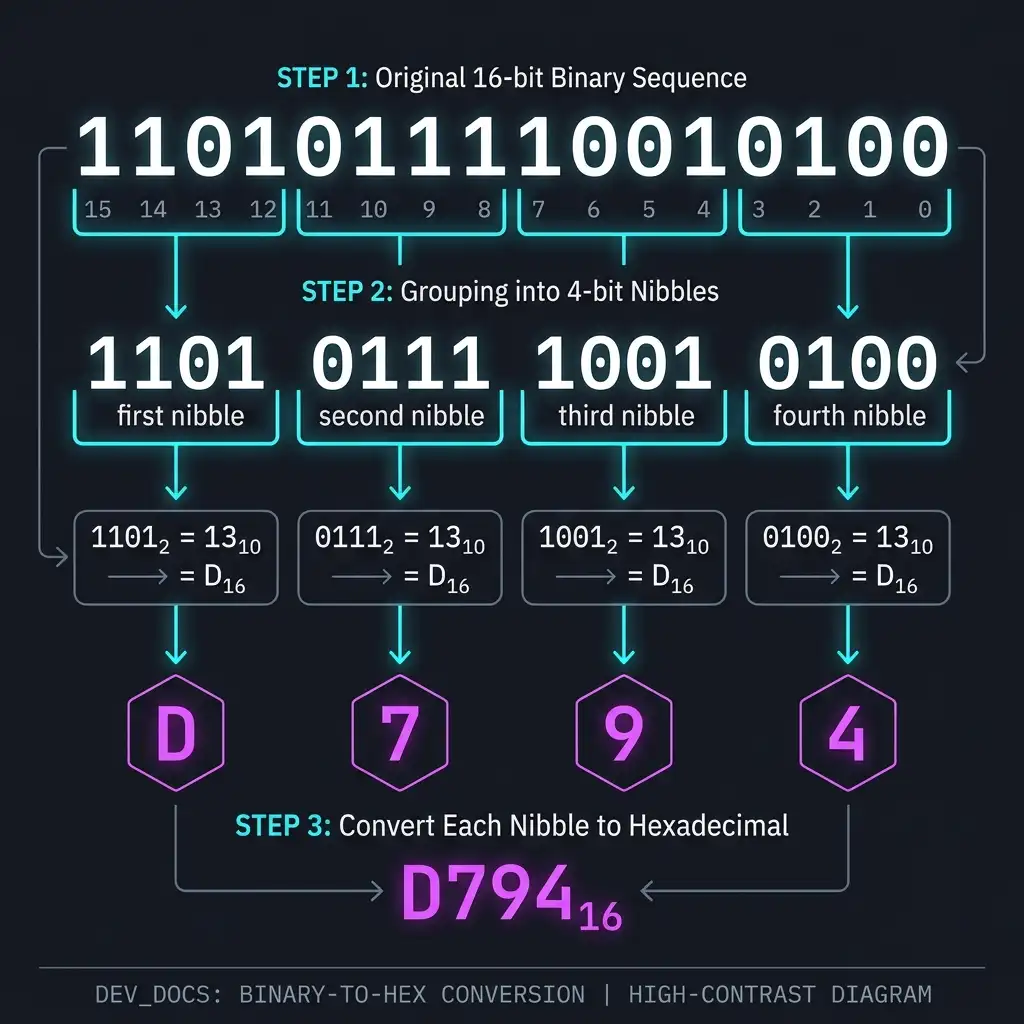
Grouping bits into 4-bit nibbles starting from the right
The whole conversion takes about five seconds once the table is memorised, and the "pad with leading zeros" rule handles any length correctly. It is the only conversion method you will need for everyday work.
Hex to Binary by Expanding
The reverse is the inverse operation. Replace each hex digit with its 4-bit binary equivalent.
Example:  0xA3F

  A   3   F
  1010 0011 1111
  ↓
  101000111111

Result: 101000111111 (12 bits)
One common slip is forgetting to keep all four bits when the high bit of a nibble is
zero. The conversion 0x5 is 0101, not 101. Always
expand to exactly four bits per hex digit, then drop any leading zeros only at the very
end if you are working with an unsigned value.
Decimal as the Middle Step (and Why You Usually Skip It)
The traditional school method for converting between binary and hex routes through decimal: convert the binary to decimal by summing positional values, then convert the decimal to hex by repeated division. That method works, but it is slow, error-prone, and never necessary. The 4-bit grouping method is exact and never requires you to touch decimal at all.
Decimal is only the right middle step when the input is already in decimal, or when the answer needs to be in decimal. For binary-to-hex or hex-to-binary in either direction, go directly.
Padding and Fixed-Width Representations
Binary strings are often written with a fixed width: 8 bits for a byte, 16 bits for a half-word, 32 bits for a word. When the value is small, the unused high bits are written as zeros. The 4-bit grouping method needs the string to be a multiple of 4 bits long to work without padding, so when you know a value is stored in a fixed-width register, pad the high end with zeros until the length is a multiple of four.
8-bit value:  1010 0011   →  0xA3     (already a multiple of 4)
              0101 0111   →  0x57

9-bit value:  1 0101 0111 →  pad to 12 bits → 0001 0101 0111 → 0x157
This is exactly why hex dumps and memory viewers always show values in fixed-width columns. A byte is two hex digits, a 16-bit word is four, a 32-bit word is eight, and a 64-bit double-word is sixteen. The 4-bit alignment of hex with the underlying memory layout is what makes hex dumps so much easier to read than raw binary.
Signed Numbers and Two's Complement
The 4-bit grouping works identically for signed and unsigned numbers, but the *interpretation* differs. In two's complement (the universal representation for signed integers in modern hardware), the high bit of the most significant byte is the sign bit, and the value is computed by subtracting 2ⁿ rather than just summing.
8-bit value:  1111 1111

Unsigned:    255
Signed:      1111 1111 = -128 + 64 + 32 + 16 + 8 + 4 + 2 + 1 = -1

16-bit value: 0xFFFE

Unsigned:    65 534
Signed:      -(2^15) + (2^15 - 2) = -2
To negate a two's-complement number, invert every bit and add one. To check the sign of a value, look at the high bit. To extend a signed value to a larger width, replicate the sign bit into the new high bits (sign extension). All of these operations are easier to read in hex than in binary, even though the underlying bit operations are the same.
Floating Point: IEEE 754 in Hex
Hex is also useful for inspecting IEEE 754 floating-point numbers, even though the standard itself is defined in binary. The trick is that 32 bits fits in exactly 8 hex digits, and 64 bits fits in exactly 16, so the raw bytes of a float can be read as a hex value and the fields extracted by masking and shifting.
Single-precision IEEE 754 (32 bits = 8 hex digits):

  0x40490FDB
  →  0100 0000 0100 1001 0000 1111 1101 1011
  →  sign 0, exponent 10000000, mantissa 10010010000111111011011
  →  +1.5707964 × 2^0  ≈  π / 2
This is exactly how a debugger displays a float when you ask for its raw
bytes. Reading these values fluently is overkill for most web work, but it is invaluable
when debugging numerical code or when reverse-engineering a binary format.
Common Bit Patterns Worth Memorising
Most of the bit patterns you encounter in real code reduce to a small set of "named" values. Memorising these saves a lot of conversions.
| Pattern | Hex | Meaning |
|---|---|---|
| 0000 0000 | 0x00 | Null byte, ASCII NUL, false |
| 0000 0001 | 0x01 | SOH, single-bit mask |
| 0000 1111 | 0x0F | Low nibble mask |
| 0011 0011 | 0x33 | Alternating pairs mask |
| 0101 0101 | 0x55 | Even-bit mask |
| 1000 0000 | 0x80 | High bit, sign bit for 8-bit ints |
| 1010 1010 | 0xAA | Odd-bit mask |
| 1100 1100 | 0xCC | Alternating pairs |
| 1111 0000 | 0xF0 | High nibble mask |
| 1111 1111 | 0xFF | All bits set, signed -1, unsigned 255 |
| 1111 1111 1111 1111 | 0xFFFF | All bits in 16 bits, signed -1 |
| 1111...1111 (32 bits) | 0xFFFFFFFF | All bits in 32 bits |
Once these are automatic, reading a hex value and instantly knowing which fields are set becomes a reflex rather than a calculation.
Try It Yourself
The fastest way to make the 4-bit grouping reflex automatic is to do a lot of short conversions. Pick any binary string of 16 to 32 bits, such as an IPv4 address, a colour value, a port number, or a memory address, and translate it to hex and back without writing the decimal value down. The 16-row mapping table is the only memorisation required, and after about twenty minutes of practice, you will not need the table any more.
For the broader context, the hex calculator guide covers arithmetic in hex, and the ASCII basics guide shows how the same byte patterns encode text in the most common character encoding.
Convert a binary string to hex (or vice versa):
Open Hex Decoder →Try the Free HexDecoder Tool
Put what you learned into practice. Use our free hex decoder and encoder to convert hexadecimal to text, ASCII, binary, and more instantly in your browser. No registration or upload required.
Open HexDecoder