Hex Calculator: Hexadecimal Arithmetic & Conversions
Why Hex Arithmetic Is Worth Knowing
Most programmers reach for a calculator when they need to add two hex values, and most calculators do not have a hex mode by default. The result is that the arithmetic gets done by hand anyway, usually in a long mental detour through decimal. With a small set of rules, and a bit of practice, you can do most hex arithmetic in your head, on paper, or in a single line of code, and skip the detour entirely.
The reason hex is worth being comfortable with is that it is the standard notation for almost every low-level artefact you will encounter: memory addresses, bit masks, file offsets, colour values, network packet headers, character codes. Once you can read and manipulate hex fluently, a lot of "mysterious" low-level data becomes tractable.
Hex Addition
Hex addition follows the same column-by-column rules as decimal addition, with one twist: the "carry" threshold is 16, not 10. When a column's sum reaches 16, write down the remainder (the sum minus 16) and carry 1 to the next column.
Example: 0x1A + 0x2F

  1  A
+ 2  F
------
  4  9

Step by step:
  A (10) + F (15) = 25  =  16 + 9  →  write 9, carry 1
  1 + 2 + 1 (carry) = 4  →  write 4

Result: 0x49 (which is 26 + 47 = 73 in decimal)
Addition with multiple carries
For slightly larger numbers, the same rules apply, and the carries just chain:
Example: 0x2A3F + 0x1B5C

  2  A  3  F
+ 1  B  5  C
-------------
  4  5  9  B

Step by step:
  F + C = 15 + 12 = 27 = 16 + 11 → write B, carry 1
  3 + 5 + 1 = 9                  → write 9, carry 0
  A + B = 10 + 11 = 21 = 16 + 5  → write 5, carry 1
  2 + 1 + 1 = 4                  → write 4

Result: 0x459B
Hex Subtraction
Subtraction is the inverse of addition. The cleanest mental model is "borrowing": if a column's top digit is smaller than the bottom digit, borrow 16 (one hex "ten") from the next column to the left. That gives you 16 extra in the current column, at the cost of one in the next column.
Example: 0x49 - 0x1A

  4  9
- 1  A
------
  2  F

Step by step:
  9 - A  →  9 < 10, so borrow:  9 + 16 = 25,  25 - 10 = 15 = F
  4 - 1 - 1 (borrow) = 2

Result: 0x2F (which is 73 - 26 = 47 in decimal)
The trick is to remember that the "borrow" in hex is 16, not 10. Once you have done it a few times, hex subtraction feels identical to decimal subtraction, just with a different character set on the page.
Hex to Decimal Conversion
The positional value of each hex digit is 16 raised to the power of its position, counted from the right starting at zero. To convert a hex number to decimal, multiply each digit by its positional value and sum the results.
0x2A3

= 2 × 16²  +  A × 16¹  +  3 × 16⁰
= 2 × 256   +  10 × 16  +  3 × 1
= 512       +  160      +  3
= 675 decimal
A handy table of positional values for the first five positions from the right:
| Position | Name | Value |
|---|---|---|
| 16⁰ | units | 1 |
| 16¹ | sixteens | 16 |
| 16² | two-fifty-sixes | 256 |
| 16³ | four-Ks | 4 096 |
| 16⁴ | sixty-fives | 65 536 |
| 16⁵ | megas | 1 048 576 |
| 16⁶ | sixteens-of-megas | 16 777 216 |
Most of the hex you encounter in everyday work lives in the first six positions (a 24-bit value), so memorising 1, 16, 256, 4096, 65536, 1048576 is enough to convert nearly any practical value by hand in a few seconds.
Decimal to Hex Conversion
The reverse conversion uses repeated division: divide the number by 16, write down the remainder, and repeat with the quotient. The remainders, read from last to first, are the hex digits.
Convert 255 to hex

255 ÷ 16 = 15  remainder 15  →  F
 15 ÷ 16 =  0  remainder 15  →  F

Read remainders in reverse: 0xFF
The same method works for arbitrarily large numbers; you just keep dividing until the quotient hits zero. For numbers that fit in a single byte, the two-step process above is usually enough. For larger values, a spreadsheet or a one-liner in your favourite scripting language is faster than doing it by hand.
Bitwise Operations: AND, OR, XOR, NOT
Hex shines in bitwise operations. Because each hex digit corresponds to exactly four binary bits, a 32-bit value is only eight hex digits long, and bitwise operations can be reasoned about one hex digit at a time.
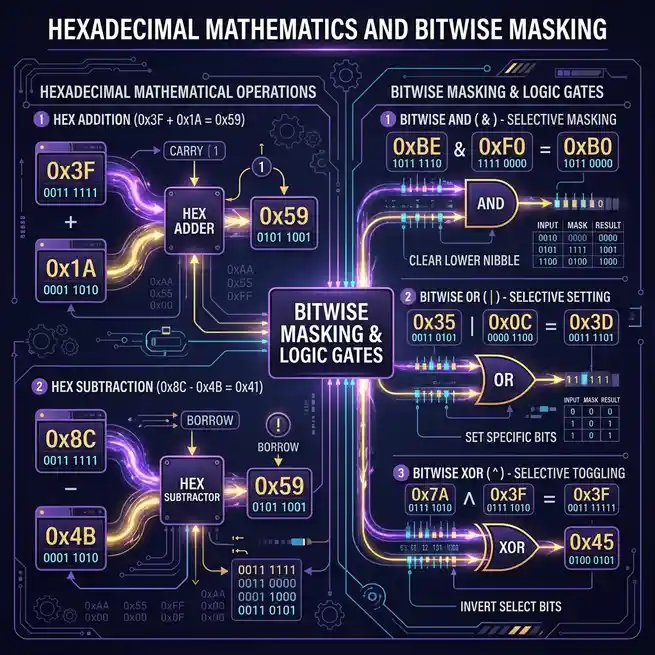
Visualizing hexadecimal addition, subtraction, and bitwise logic
AND (&)
Sets each bit to 1 only if both inputs have a 1 in that position. Used for masking, to extract specific bits from a value.
  0xF0 & 0x3C  =  0x30

  1111 0000
& 0011 1100
  ----------
  0011 0000
OR (|)
Sets each bit to 1 if either input has a 1. Used for combining flags or for forcing specific bits on.
  0xF0 | 0x0F  =  0xFF

  1111 0000
| 0000 1111
  ----------
  1111 1111
XOR (^)
Sets each bit to 1 if the inputs differ. The workhorse of cryptography, checksums, and a thousand clever tricks.
  0xFF ^ 0x0F  =  0xF0

  1111 1111
^ 0000 1111
  ----------
  1111 0000
NOT (~)
Flips every bit. In most languages, NOT is defined on a fixed-width integer, so the
result depends on the size of the type. For an 8-bit value, ~0x0F is
0xF0; for a 32-bit value, it is 0xFFFFFFF0.
Shifts: Multiplying and Dividing by Powers of Two
Shifting a hex value left by one bit is equivalent to multiplying by 2; shifting it right is dividing by 2. This is the underlying reason hex pairs up so nicely with binary: a left shift by four bits (one hex digit) is a multiplication by 16, and a right shift by four bits is a division by 16.
0x10  <<  4   =  0x100      (16  ×  16   =  256)
0x10  >>  4   =  0x01       (16  ÷  16   =  1)
0xFF  <<  8   =  0xFF00     (255 × 256   =  65280)
0x100 >>  8   =  0x01       (256 ÷ 256   =  1)
Shifts are also how you pack and unpack multi-byte values. To store a 16-bit number in
the high and low bytes of a 32-bit word, shift the high byte left by 8 and OR it with
the low byte. To read it back, mask the high byte with 0xFF00 and shift it right by 8;
the low byte is just value & 0xFF.
Real-World Uses for Hex Arithmetic
A few of the most common use cases, with worked examples, are below.
Memory addressing and offsets
When reading or writing memory-mapped hardware, addresses and offsets are almost always expressed in hex. Adding an offset to a base address is a one-line hex addition:
Base address:    0x1000
Field offset:    0x00FF
Address of field: 0x10FF
Colour arithmetic
Adding two colours channel-by-channel is a quick way to produce a brighter variant. The naive "average" works for mid-tones, but a more useful trick is "lighten". Interpolate from a colour to white by a percentage of each channel.
Original:    #0EA5E9  (R:14,  G:165, B:233)
20% lighter: each channel → 0.8 × original + 0.2 × 255
             R: 79 + 51 = 130
             G: 82 + 51 = 133
             B: 193 + 51 = 244
             Result:  #8285F4
Bit masks for flags
A flag register is just a small integer where each bit is a separate boolean. To check, set, or clear a flag, you combine the flag's value (a power of two) with the register using AND, OR, or AND-NOT:
FLAG_READY   = 0x01
FLAG_ERROR   = 0x02
FLAG_BUSY    = 0x04

Check if ERROR:   (flags & FLAG_ERROR) != 0
Set READY:        flags = flags | FLAG_READY
Clear BUSY:       flags = flags & ~FLAG_BUSY
File offset arithmetic
Hex dump tools, binary file parsers, and disk imaging tools all show offsets in hex
because the alignment is naturally 16 bytes per row. When you see 0x1F4 as
a file offset, you can read it as "row 0x1, column 4" almost without thinking.
When to Use a Calculator vs. Do It by Hand
For numbers up to four hex digits (16 bits), hand calculation is usually faster than reaching for a tool. For larger numbers, or for chains of operations, a calculator or one-liner is the right call. Three practical tips from real use:
- For one-off conversions, use the HexDecoder tool. It will accept decimal input, hex input, or binary input and show the result in all three at once.
-
For chains of operations, drop into your editor. Most languages
accept hex literals natively. In JavaScript:
parseInt('FF', 16)gives 255, and(0x10 << 4).toString(16)gives "100". In Python:0xFFis 255, andhex(0xFF + 0x01)is "0x100". -
For bitwise work, write the binary out. The four-bit-per-digit rule
is much easier to internalise when you actually write
1111 0000and0011 1100down on paper, do the bitwise operation visually, and then translate back to hex.
Try It Yourself
The fastest way to internalise hex arithmetic is to use it. Pick three of the worked examples above and redo them without looking: the 0x1A + 0x2F addition, the 0xFF ^ 0x0F XOR, and the lighten-by-20% calculation are all good candidates. Once those feel mechanical, try one with numbers you actually care about, such as the address of a field in a struct you are debugging, or the colour values of a palette you are building.
For the broader foundation this builds on, the binary to hex conversion guide covers the underlying number system, and the ASCII basics guide shows how the same hex arithmetic shows up in text encoding.
Convert a hex value, add an offset, or check a bit mask:
Open Hex Decoder →Try the Free HexDecoder Tool
Put what you learned into practice. Use our free hex decoder and encoder to convert hexadecimal to text, ASCII, binary, and more instantly in your browser. No registration or upload required.
Open HexDecoder